Can security cameras work without WiFi or internet?
By Wang Yanling
Can Security Cameras Operate Without Wi-Fi or Internet?
Yes — many security cameras are capable of functioning even when Wi-Fi or internet is unavailable. Depending on the camera type, video footage can be saved locally, allowing you to maintain continuous surveillance and protect your property even in areas without network access.
1. Soliom Solar Cameras with Homebase
Soliom solar cameras (The 5MP and 8MP Kits) connect directly to the Homebase through a dedicated local network. Once powered on, the cameras automatically pair with the Homebase to ensure stable communication and continuous recording, even if your internet temporarily goes down.
However, the Homebase system still requires Wi-Fi for normal remote access, notifications, and cloud-related features. When the internet is disconnected, the cameras can continue recording locally, but these offline recordings are only stored temporarily and will be automatically deleted after 48 hours if the network is not restored.
2. Cellular Security Cameras
For locations without Wi-Fi or standard power sources, cellular security cameras provide a reliable solution for remote monitoring. These 4G LTE cameras can record footage directly to an SD card or cloud storage, ensuring important events are captured even when offline. Instead of relying on Wi-Fi, they transmit video through cellular networks, allowing you to view live or recorded footage anytime on your smartphone or computer. This makes them ideal for off-grid settings such as farms, cabins, construction sites, or vacation homes.
3. Security Cameras with SD Cards
IP cameras equipped with SD cards can save motion-activated recordings directly to the card. Whenever the camera detects activity, it stores the video clips locally, ensuring you still capture key events even if there’s no Wi-Fi connection. Keep in mind that SD-card-based cameras only store motion events, not continuous 24/7 footage, when operating offline.
How to Connect Soliom 5MP/8MP Security Camera Kits to Homebase?
Determine Which Security Cameras to Buy?
For home use, the Soliom 5MP Kit is a cost-effective choice. Priced as low as $75 per camera, it requires minimal maintenance and comes without any monthly fees, helping you save money every day while keeping your home protected.For home use, the Soliom 5MP Kit is a cost-effective choice. Priced as low as $75 per camera, it requires minimal maintenance and comes without any monthly fees, helping you save money every day while keeping your home protected.
For remote areas without Wi-Fi, you can choose the Soliom S600 4G. Already a best-seller with nearly 1,000,000 units sold, it offers reliable performance, comes with a free SD card for local storage, and includes an unlimited 4G data plan starting at just $9.90 per month
Q: BE HONEST: are there REALLY no monthly fees? What premium features am I losing if I don't subscribe?
A: There is absolutely no catch, and there are zero mandatory subscriptions. The modern security industry relies on a "razor and blades" model: sell a cheap camera, then hold your basic features (like video playback, AI human detection, and rich notifications) hostage behind a $10-$15 monthly paywall. Over 3 years, that’s $360 to $540 out of your pocket.
Soliom rejects this model. Every premium feature we offer—from the Triple-Trigger AI detection to the PTZ Auto-tracking and local storage, is hardwired into the equipment you purchase.
You buy the hardware once, and you own your security forever.
Q: Why do I need a Local Base/Station? Can't I just connect the cameras directly to my home Wi-Fi like every other brand?
A: You can connect standard cameras to your Wi-Fi, and that is exactly why they fail when you need them most. Home routers are designed to stream Netflix to your living room, not to push high-bandwidth video through exterior brick, stucco, and metal siding. When standard Wi-Fi cameras drop their signal, you get the dreaded "spinning loading wheel" instead of a live view of the intruder in your driveway.
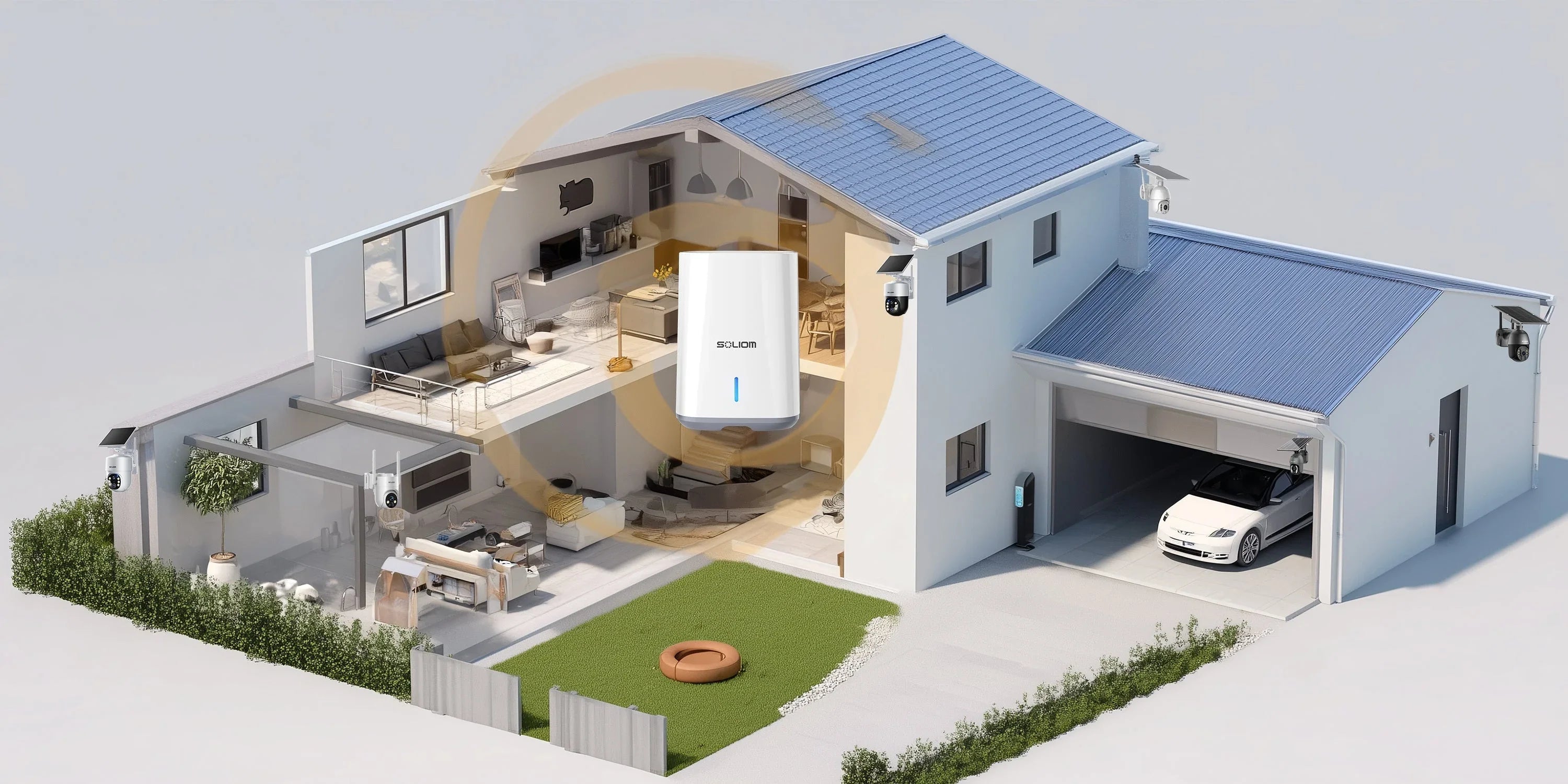
We bypassed your home Wi-Fi limitations entirely. The Soliom Base Station hardwires directly into your router via a physical LAN cable and broadcasts its own proprietary, dedicated wireless channel exclusively to the cameras. In an open area, this private signal reaches a staggering 1300 ft (400 meters). It effortlessly penetrates thick exterior walls to secure your detached garage, long driveway, or deep backyard without ever congesting the bandwidth you use for your phones and computers.
Q: If a burglar smashes or steals the outdoor camera, do I lose the video evidence?
A: No. This is the fatal flaw of 95% of consumer security cameras. They put the MicroSD card directly into the outdoor unit. If a thief hits the camera with a baseball bat or simply unscrews it and walks away, your video evidence walks away with them. It’s an illusion of security.
With the Soliom SH-Series, we use a "Split-Architecture." The outdoor camera is merely the lens; the "brain and memory" is the Base Station locked safely inside your house. All 15fps H.265 video footage is instantly transmitted and encrypted onto the Base Station’s built-in memory the millisecond an event occurs. They can destroy the camera outside, but the 4K recording of their face doing it is already secured indoors.
Q: What happens if a storm knocks out my internet, or a thief cuts my broadband cable before breaking in?
A: Your property remains completely monitored and secure. Cloud-dependent cameras turn into useless plastic bricks the moment your internet drops. The Soliom system is engineered for redundancy. Because the cameras communicate directly with the Base Station via a private closed-loop network, they do not require an active internet connection to function. As long as the Base Station has power, the system will continue to trigger, track, and record high-resolution video for up to 2 days entirely offline. Once your internet provider restores service, you simply open the app and review all the recorded offline events.
Q: I am terrible with tech. Do I need an IT degree to configure four different cameras to a Base Station?
A: It’s strictly plug-and-play. Anyone who has tried to pair four standalone cameras knows the nightmare: scanning multiple QR codes, typing in Wi-Fi passwords, and dealing with 2.4GHz pairing timeouts. We eliminated that.
The 4 cameras in your bundle come factory-paired to the Local Base Station out of the box. You do not need to enter Wi-Fi passwords. You plug the Base Station into your router, mount the cameras, turn them on, and they instantly appear live on your Soliom App. It takes the frustration out of DIY installation.
Q: I just upgraded to a high-end Wi-Fi 6 Mesh system (like Eero or Nest). Will these cameras have trouble connecting?
A: Zero trouble. Modern Wi-Fi 6 mesh routers blend 2.4GHz and 5GHz bands together, which notoriously breaks the setup process for traditional smart home devices. Because the Soliom Base Station uses a physical Ethernet cable to connect directly to your router, it completely bypasses wireless pairing issues. It works flawlessly with every single router on the market—whether it's Wi-Fi 5, Wi-Fi 6, or a 5G cellular gateway.
Leave a comment
This site is protected by hCaptcha and the hCaptcha Privacy Policy and Terms of Service apply.